CPSC 350 - Applications of Databases - Spring 2026
Assignment #8
Possible experience: +40XP
Due: Saturday, April 25
The DB World Tour®, stop #3 of 4:
MongoDB
In the third installment of your DB World Tour project, you'll add the next
fourth of your website, backed by a MongoDB database.
Your topic and Assignment #8
Identify some different aspect of your assignment #6 & #7 topic that
would lend itself well to what MongoDB provides: a schema-less (or
"schema-flexible") structure. Every document it stores is ultimately a
dictionary with key/value pairs, and the values can in turn be nested lists
and/or dicts at your discretion.
As before, pick something interesting and non-trivial, but not
exhaustive.
Mongo databases
Start by choosing a Mongo database name for the cpsc server, with your
UMW Net ID as part of it. For instance, horses_jwilli28 and
sdavis17db are both acceptable names.
Note: in Mongo, you don't have to execute any kind of separate "create
database" command; instead, you simply "use" the database as if it already
exists, and it will. (On the mongosh, the syntax is "use
myDatabaseName". In Python, you'll simply access the value of a (new) key
from your MongoClient dictionary-like object.)
A note about jerks
Don't be a jerk. Leave other people's databases alone, and only work in
yours. You shouldn't change their data in any way, or even look at it. Nobody
likes a nosy jerk.
Assignment #8 requirements
Your goal in this project is to integrate MongoDB into your master database
tour website. I am very flexible as to how you do this. If you have a
creative way to integrate MongoDB into your site that is different from what
I've described below, absolutely do that instead of what I've outlined!
Creativity is good. Only mimic what I have if you can't think of anything else
creative.
The way my own website works is as follows:
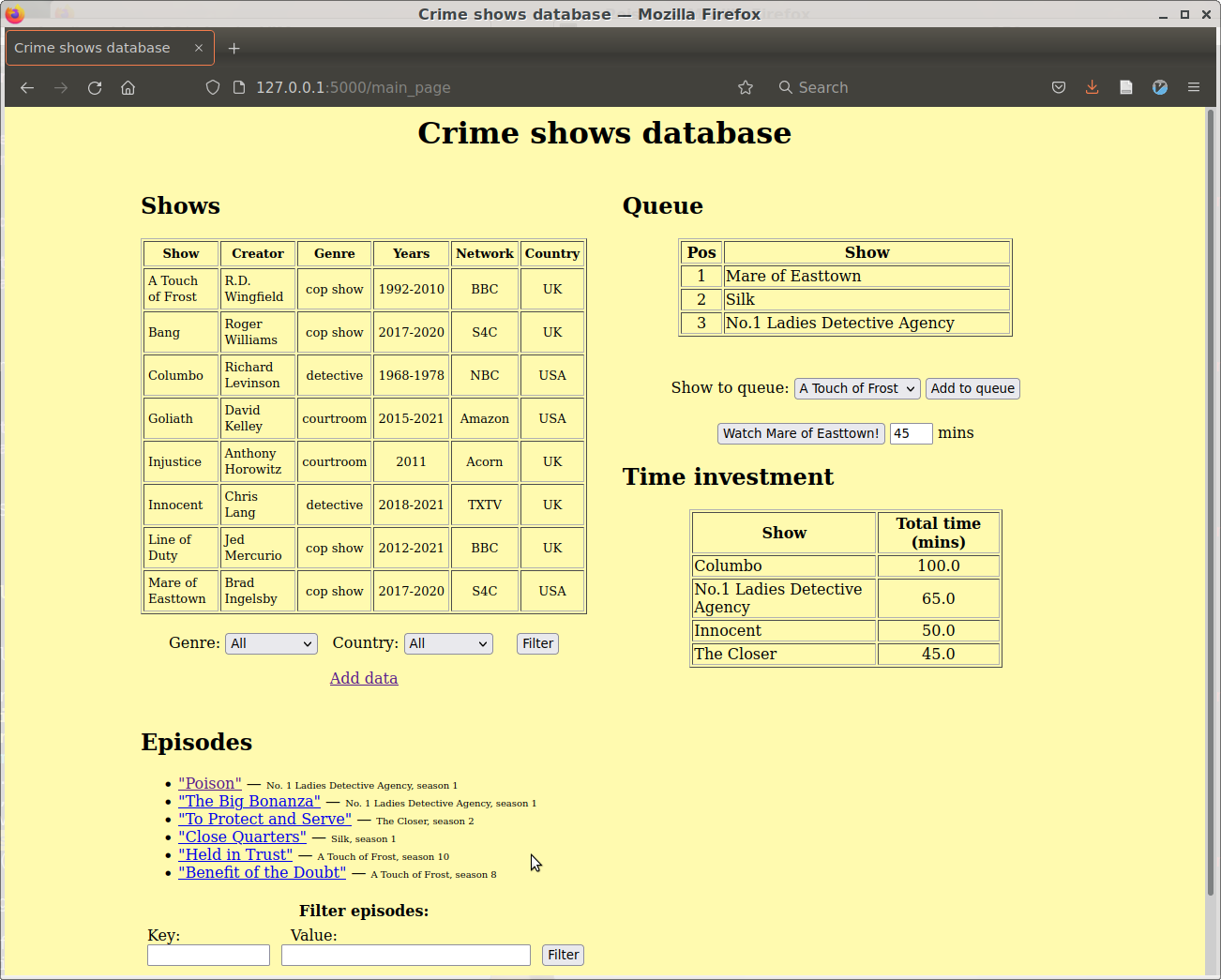
- On the main page, I display an abbreviated list of the names of
objects in your Mongo database. ("Name" just means "some identifiable,
human-readable key." I use the title of the crime show episode in my example
below. Substitute whatever is appropriate in your case.) I also show
select other information where I feel this enhances the user experience (I
include the name of the overall crime show, and also the season and episode
numbers.)
- Immediately beneath this list I have a form in which the user can type
key/value pairs and filter the list based on them. When
the button is pressed, the page should refresh and display only
documents that have that key/value pair as a top-level attribute.
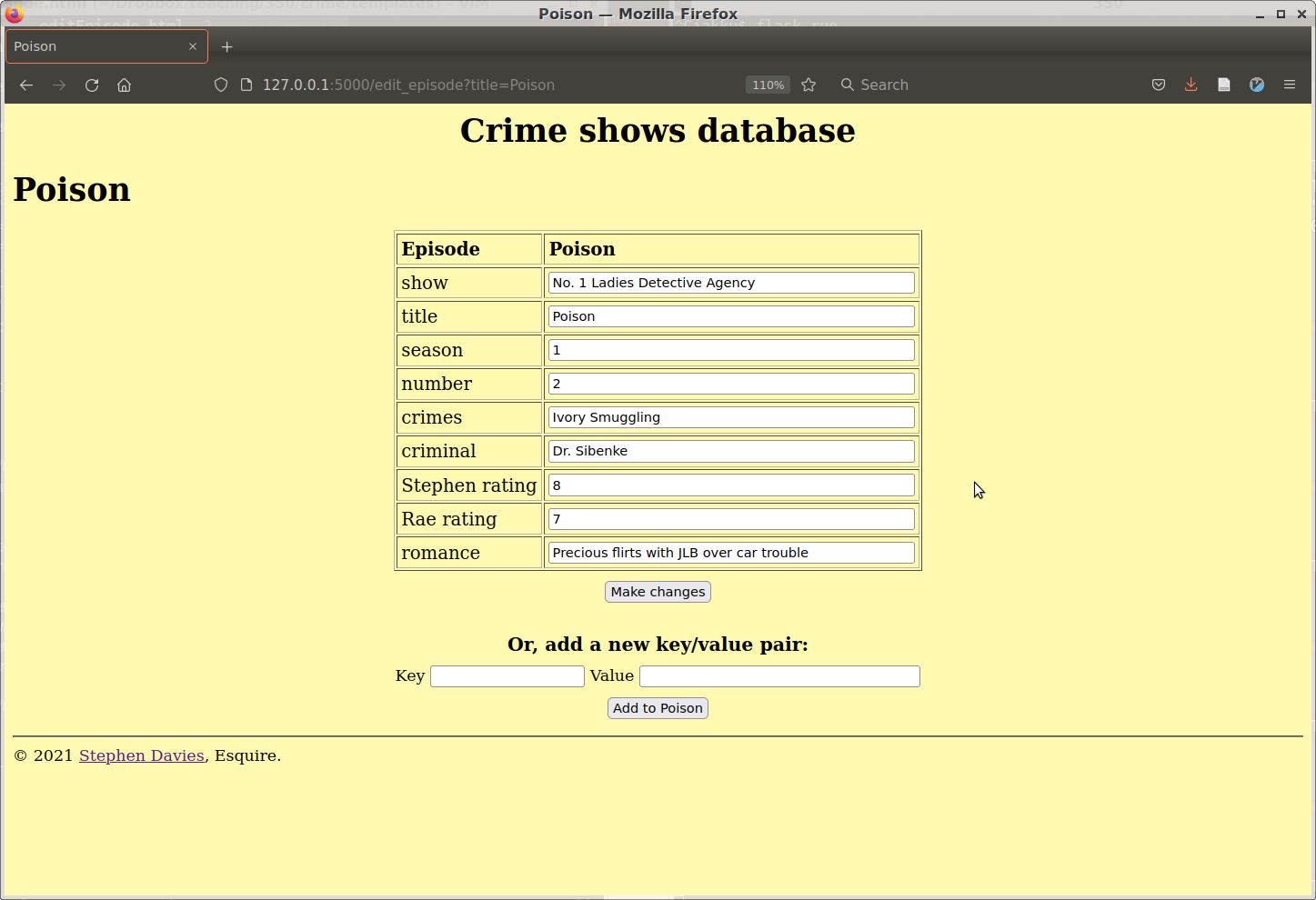
- The names of the objects are hyperlinks, each of which will direct the user
to an "edit page." On the edit page, the user can change the values of any of
the fields (except the name), and press a "save changes" button to get those
changes to persist in the Mongo database. After the button is pressed, the site
redirects the user back to the main page, with a friendly "(name of object)
updated successfully!" message.
- Alternatively, the user can instead interact with a separate form that
allows him/her to add a new key/value pair to the object in question.
The user is then be redirected back to the main page again.
Example
Here's what my new assignment-#8-compatible landing page looks like (see
bottom-left):
And here's my "edit" page for Mongo:
Other cool ideas
Consider adding one or more of the following features:
- Add multiple filters on the main page instead of just one. When more than
one is used, only documents with key/value pairs matching all the filter
criteria should appear in the list.
- Allow users to also filter on the existence of a field, rather than
on a specific field value. (In my example, I should be able to say "show all
episodes that have a 'courtroom verdict' key at all," instead of only
being able to say "show all episodes that have a 'courtroom verdict' of 'not
guilty.')
- Add a "clear filter" button which will eliminate all the filter criteria
and refresh the page with all documents again eligible to appear in the
list.
- Implement "smart filter" functionality, such that instead of the entire
value having to match what the user types, only part of it needs to match. (In
the example above, for instance, if I filtered on a "romance" key with value
"flirt," it should match the Poison episode.)
- Implement "ranged filter" functionality, such that for numeric values, the
user can specify min and max values and obtain only documents whose values fall
within that range. (In the example above, the user would effectively be able to
say "find all episodes whose 'Stephen rating' is between 6 and 9," for
instance.)
- Add "delete" buttons next to each field on the "edit" page, such that when
the user clicks on one, that key/value pair is eliminated from that Mongo
object.
- Incorporate a sensible way to enter, edit, and filter nested
structure within a document. In other words, the values of key/value pairs no
longer must be only strings, but can instead be lists of strings or
dictionaries with their own nested key/value pairs.
Turning it in
Send me an email with subject line "CPSC/DATA 350 Assignment #8
turn-in". In the body of the email, simply paste the link to your
website.
Getting help
Come to office hours, or send me email with subject line "CPSC/DATA 350
Assignment #8 help!!"